DOWNLOADS

Candy System

Integrated Project Management System, specifically developed for the Construction Industry, for use by large multinational consortia or by small contractors.

CANDY SYSTEM

Once you have downloaded and installed this version, all further updates can be done within Candy via the Update Candy option in the Support menu

Download file
setup.exe - 25 MB

Candy language files

Ficheiro de linguagem
PORT.GNL 242 KB
Download file
Archivo de idioma
SPANISH.GNL 245 KB
Download file
Fichier de langue
FRENCH.GNL 242 KB
Download file
Pakiet językowy
POLSKI.GNL 242 KB
Download file
Sprachdatei
GERMAN.GNL 242 KB
Download file
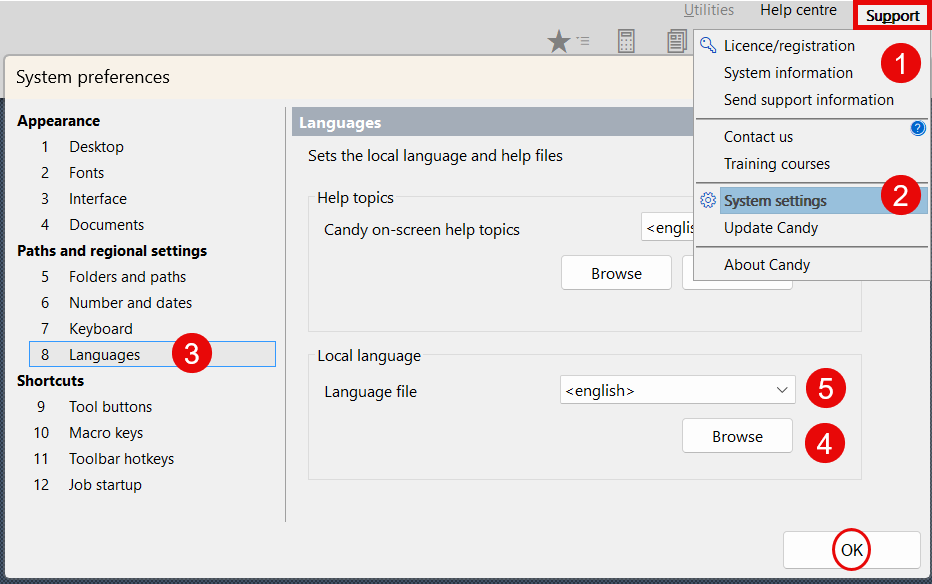
HOW TO CHANGE THE LANGUAGE ON THE CANDY SYSTEM?

QTO System

Candy's QTO module provides a solution for measuring and extracting quantities from drawings, in 2D formats, enabling the compilation of bills of quantities, and full interaction with Candy's project control components.

CANDY SYSTEM

Once you have downloaded and installed this version, all further updates can be done within Candy via the Update Candy option in the Support menu.

Download file
setup.exe - 151 MB

Sistema CT imeMS

Aimed at the Estimating department, it allows the consolidation of data from all projects, enabling the control of estimates to the required level of detail

Download CTimeMS for free

1.17c c260119

32 bits >>Microsoft Access 2019 or higher / 64 bits >>Microsoft Access 365
CTimeMS 32 bits
Download file
14 MB
CTimeMS 64 bits
Download file
12 MB

CT imeMS Manuals

Installing the System
CTimeMS_SY01.pdf - 2 MB
Download file
Requesting a License
CTimeMS_SY02.pdf - 463 KB
Download file
Configuring User Access
CTimeMS_SY05.pdf - 349 KB
Download file
Updating CTimeMS
CTimeMS_SY03.pdf - 660 KB
Download file
HOW TO INSTALL AND UPDATE CTimeMS?

Step 1 - Download (https://www.timelink.pt/en-uk/downloads) the appropriate installation file (CTimeMS_64.zip or CTimeMS_32.zip).

Step 2 - Copy the zip file to the CTimeMS installation folder on the server or local drive.

Step 3 - Access the zip file properties (right-click) and enable the [Unblock] field.


Step 4 - Extract the files using 7Zip or WinRAR using the [Extract here] option.


Please note: If you use the Windows Explorer option, you must correct the destination folder, as the system suggests creating a subfolder with the name of the zip file.

SitePlan Viewer

SitePlan Viewer is powerful, free software that allows you to easily view and interact with schedules created with RIB Candy Planning software.

Versão 25.03.03

Whether you're a project manager, a team member or a stakeholder, SitePlan Viewer offers a seamless experience for accessing your project calendars.

Download file
SPviewSetup.exe - 17.4 MB

External Support Applications

Team Viewer | Remote support software

Download file
teamviewerQS.exe

Candy PDF Writer

Download file
PDFsetup64.exe